

Zoho Books vs Quickbooks: 2026 Comparison (Pros, Cons, Pricing)
If you run a small business and you’ve hit a wall when it comes to managing finances, you’re likely looking at tools to help you take care of some of the workload.
Article contents
− +
Choosing between Zoho Books and QuickBooks Online is a bit like choosing between Coke and Pepsi. They’re both popular options, but not necessarily the best for your specific needs.
Today, we take a look at Zoho Books and QuickBooks, comparing their key features, pricing, ease of use and fit for small businesses operating in Australia.
Zoho Books | QuickBooks Online | |
Best for | Small to mid-sized businesses already using Zoho | Growing small businesses that need strong reporting and broad integrations |
Free plan | Free plan available with limits | No free plan, 30 day trial only |
Starting price | $0 free plan, paid plans from $16.50 per month | Paid plans from $16.50 per month |
Number of plans | 1 free plan, 5 paid plans | 4 paid plans |
Invoicing | Custom templates, recurring invoices, automated reminders | Payment links, recurring invoices, automated reminders |
Expense tracking | Bank feeds, vendor portal, expense matching | Bank feeds, rules-based categorisation, fast reconciliation |
Inventory management | Available on higher plans only | Available from Plus plan |
Project tracking | Available from Professional plan | Available from Plus plan |
Time tracking | Limited, mainly via projects | Built-in time tracking for billable hours |
Payroll | Not available in Australia | Available as paid add-on in many regions, including Australia |
Reporting | Solid core reports, advanced analytics on higher tiers | Strong reporting across all paid plans |
Integrations | Best within Zoho ecosystem, limited external apps | Hundreds of third-party integrations |
Mobile app | Yes, full-featured mobile apps | Yes, full-featured mobile apps |
Ease of use | Clean interface, more manual setup | Guided workflows, more hand-holding |
Customer support | Email on free plan, phone and chat on paid plans (24 hours a day, 5 days a week in Australia) | Phone, chat, email, often round the clock (for Australia: 7 AM - 8 PM Sydney time) |
Scalability | Works well if you stay within the Zoho stack | Easier to scale with mixed tool stacks |
Typical downside | Limited integrations outside Zoho | Cost increases quickly with add-ons |
Get the better alternative to Zoho Books and QuickBooks, built specifically for sole traders in Australia.
Zoho Books vs QuickBooks: What they are and who they’re for
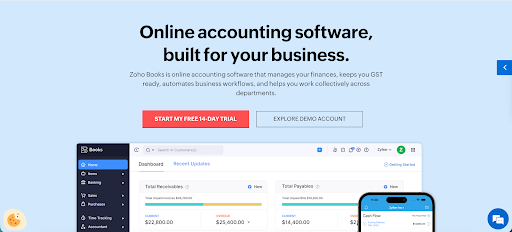
Zoho Books is cloud accounting software built for small and mid-sized businesses, with essential accounting tools. For those with more advanced needs, Books integrates with other Zoho apps if you already use that ecosystem.
It’s best known for being affordable with a free plan that can take care of your basic accounting needs.

QuickBooks by Intuit is one of the most widely used accounting tools globally. It’s built for small to medium businesses that need robust reporting, payroll support in many regions, and access to a broad third-party app ecosystem.
Their target audience is established and growing businesses that need more advanced bookkeeping features.
Speaking of which, here’s what makes both tools stand out.
Zoho Books vs QuickBooks: Key features
Zoho Books features
Zoho Books covers a wide range of accounting needs, with features that scale from basic invoicing to more advanced financial management as your business grows.
Invoicing is flexible and well-suited to service-based businesses. You can create custom invoice templates, set up recurring invoices for retainers or subscriptions, and automate payment reminders. This reduces follow-ups and helps keep cash flow predictable without manual work.
Expense tracking is tightly integrated with bank reconciliation. Transactions can be pulled in automatically from connected bank accounts and matched against expenses, while the vendor portal makes it easier to manage supplier details and bills in one place.
This is useful for businesses that want clearer visibility into spending without relying on spreadsheets.
Inventory tracking is available on higher plans and gives you insight into stock levels, cost of goods sold, and inventory value. Combined with cash flow views, this helps businesses understand how stock movement impacts available cash, which is especially important for product-based companies.
Reporting and forecasting tools cover the essentials like profit and loss, balance sheets, and cash flow statements, with more advanced options unlocked on higher tiers. You can also create custom reports and track trends over time, which helps with planning and decision-making.
The client portal gives customers a self-service way to view invoices, make payments, and communicate with your business. This reduces back-and-forth emails and creates a more professional experience for clients.
The Zoho Books mobile app lets you send invoices, record expenses, and review financial data while away from your desk. This is particularly useful for freelancers and small teams that work on the move.
QuickBooks features
QuickBooks is built to handle both everyday bookkeeping and more complex accounting needs, which is why it is widely used by growing small businesses and accountants.
Invoicing in QuickBooks is flexible and automation-focused. You can add payment links directly to invoices, set up recurring invoices, and send automatic reminders for overdue payments.
This helps reduce late payments and manual follow-ups, especially for service-based businesses.
Bank feeds are one of QuickBooks’ strongest areas. Transactions sync automatically from connected bank accounts and are matched quickly using rules and suggestions. Reconciliation is fast and accurate, which is helpful if you process a high volume of transactions each month.
Payroll is available as an integrated add-on in many regions, with built-in tax calculations and compliance support. This allows businesses to manage wages, taxes, and reporting within the same system instead of relying on separate payroll software.
Project tracking and job costing tools let you track income, expenses, and time against specific projects. This is particularly useful for agencies, consultants, and trades that need visibility into project profitability rather than just overall business performance.
Sales tax tools help track tax obligations across transactions and generate reports for filing. This reduces manual calculations and lowers the risk of reporting errors as your business grows.
Time tracking allows teams to record billable hours and link them directly to projects or invoices. This makes it easier to bill clients accurately and understand how time is spent across the business.
Integrations
If you need seamless integration with other tools in your tech stack, this is a key differentiation point.
Zoho Books integrates well with other Zoho platforms, while QuickBooks Online is better connected to just about everything else.
Zoho Books integrations
Zoho Books is built to work best inside the Zoho ecosystem.
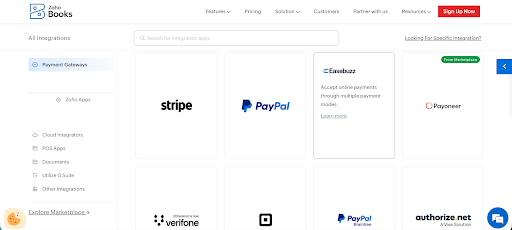
It plays well with Zoho apps such as Zoho CRM, Zoho Inventory, Zoho Payroll, Zoho Projects, Zoho Desk, and Zoho Analytics. If you already use Zoho tools, Books will feel right at home.
For payments, Zoho Books supports major gateways like Stripe, PayPal, and GoCardless, which cover most common online payment needs.
It also connects with a limited selection of third-party business tools such as Office 365, Google Workspace, Zapier, Slack, OneDrive, and WhatsApp. This covers the basics, but is nowhere near the level of QuickBooks integrations.
Problems start when you want to connect Zoho Books with anything outside of the Zoho ecosystem. You'll have a limited choice of CRMs, ecommerce tools and other third-party apps.
In most cases, you'll have to resort to building a custom integration or connecting apps with Zapier, which are neither fast nor cheap.
QuickBooks integrations
QuickBooks has one of the largest integration ecosystems in small business accounting. It connects with hundreds of third-party tools across payments, ecommerce, payroll, expenses, reporting, and CRM systems.
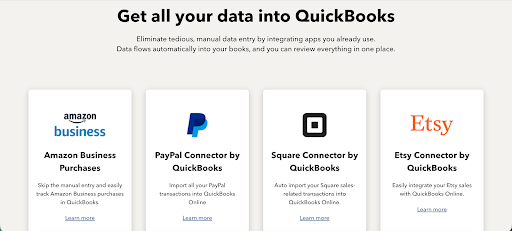
This makes it easier to plug QuickBooks into an existing business setup instead of changing how your team already works.
For online sellers, QuickBooks integrates with popular ecommerce platforms so sales, fees, taxes, and refunds can sync automatically.
Payment processors can push transactions directly into your books, reducing manual entry and reconciliation work.
Expense management tools can feed employee spending into QuickBooks with receipts attached, which helps keep records clean and audit-ready.
QuickBooks also connects with a wide range of CRM, project management, and reporting tools through the QuickBooks app store.
Zoho Books vs QuickBooks: 2026 pricing comparison
QuickBooks Online and Zoho Books have similarly priced entry-level plans, but this is where the similarities end.
Zoho Books pricing
One of the biggest advantages of Zoho Books is their entirely free plan.
It comes with some limitations, but it's good enough to try out the key features before moving to one of the four paid plans.
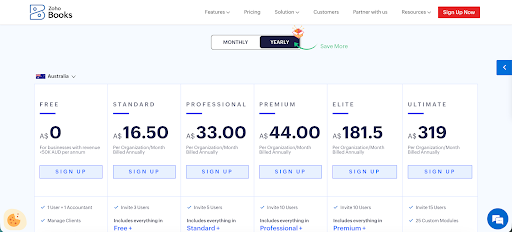
This is what you can choose from:
Free plan: $AUD 0/month
The Free plan is best for sole traders and very small businesses that want to test Zoho Books and already use other Zoho apps.
It comes with:
One user plus one accountant
Up to 1,000 invoices per year
Client portal, custom invoices, credit notes, and automated reminders
GST tracking and BAS generation
Stripe, PayPal, and GoCardless payments
Zoho ecosystem integrations and mobile apps
Standard: Starts at $AUD 16.50/month
Standard is best for very small businesses that need higher invoice limits and bank feeds.
It includes everything in the Free plan plus:
Up to three users
5,000 invoices per year
Bank and credit card feeds
Progress invoicing and retention payments
Custom fields, reporting tags, and transaction locking
Additional payment gateways and Zendesk CRM integration
Professional: Starts at $AUD 33/month
Professional is best for small teams and growing businesses that need project tracking and approvals.
It includes everything in Standard plus:
Up to five users
Project expense tracking and profitability
Sales approvals and retainer invoices
Purchase orders and vendor credits
Workflow rules and Zoho Projects integration
Premium: Starts at $AUD 44/month
Premium is best for established and mid-sized businesses that need forecasting and deeper configuration.
It includes everything in Professional plus:
Up to ten users
Revenue recognition and fixed assets
Budgeting and cash flow forecasting
Custom domain and vendor portal
Zoho Sign and Twilio integrations
Elite: Starts at $AUD 181.50/month
Elite is best for product-based businesses that need advanced inventory control.
It includes everything in Premium plus:
Serial and batch tracking
Multiple warehouses and bin locations
Composite items and stock transfers
Shopify integration
Inventory valuation and reporting
Ultimate: Starts at $ AUD 319/month
Ultimate is best for larger teams that need advanced reporting and maximum flexibility.
It includes everything in Elite plus:
Up to fifteen users
Advanced analytics and financial dashboards
Custom report creation
Higher automation limits
Extended custom fields
QuickBooks Online pricing
The biggest difference between Zoho Books and QuickBooks Online pricing is that QuickBooks doesn't have a free plan you can use to try out all the features before committing.
The best you can get is a 30-day free trial. They do, however, offer free onboarding, data migration and unlimited support.
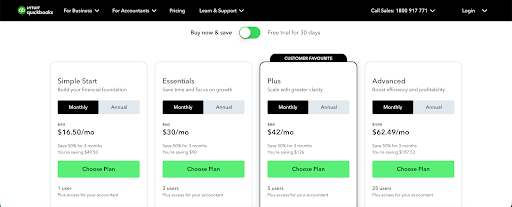
Quickbooks pricing plans are just as confusing as Zoho because you need to do some research to find the best fit for your business.
Four plans are offered:
Simple Start: Starts at $AUD 16.50/month
Simple Start is best for sole traders and very small businesses that need fundamental accounting and basic bookkeeping tools.
It comes with:
Professional invoicing and customised quotes
Bank connection and automatic transaction imports
Expense tracking and categorisation
GST and BAS tracking and reporting
Basic financial reports
Mobile app access
Essentials: Starts at $AUD 30/month
Essentials is best for small businesses with a few team members that need additional bill and time management capabilities beyond the basics.
It includes everything in Simple Start plus:
Up to three users with controlled access
Supplier bill management
Time tracking for jobs or projects
Accounts payable and vendor payment tracking
Expanded reporting options
Plus: Starts at $AUD 42/month
Plus is best for growing small businesses that need inventory tracking, project profitability insights, and support for more users.
It includes everything in Essentials plus:
Up to five users
Inventory tracking with stock levels and cost of goods sold
Project tracking and job profitability reporting
More advanced financial reports
Advanced: Starts at $AUD 62.49/month
Advanced is best for larger small businesses and mid-sized teams that need deeper reporting, automation, and support for more users.
It includes everything in Plus plus:
Up to 25 users
Advanced reporting and custom report builder
Workflow automation and approval rules
Batch invoicing and batch expense management
Priority customer support and onboarding assistance
Notes: Payroll management and certain add-ons are billed separately.
Zoho Books vs QuickBooks: Ease of use
Both platforms are fully cloud-based and can be accessed from a browser or mobile app, but they feel quite different once you start working inside them.
QuickBooks is generally easier to navigate if you are new to accounting or want clear guidance while setting things up.
Things like connecting a bank account, creating invoices, categorising transactions, and running reports are well signposted in the QuickBooks dashboard.
The interface relies heavily on prompts, reminders, and built-in tips that explain what to do next.
Reporting is also easier to interpret for many users, with common reports being easy to find and presented in a familiar format that accountants and bookkeepers already recognise.
Zoho Books offers a cleaner and more minimal interface, which can feel simpler at first glance, especially if you only need basic invoicing and expense tracking.
However, as you move beyond the basics, the setup becomes more hands-on. Many features require manual configuration, and some settings are buried deeper in menus.
This gives you more control over how things work, but it also means there is less help along the way.
If you enjoy configuring systems or already use other Zoho products, this may just work for you. Otherwise, getting up and running will take more time.
Customer support
Both Zoho Books and QuickBooks offer multiple support channels, including email, phone, and live chat, along with written documentation and learning resources.
The real difference comes down to availability and how much help you get without upgrading your plan and spending more.
Quickbooks Online support
QuickBooks generally provides better support coverage, including round-the-clock assistance in many regions. For Australia, that means coverage from Monday to Friday, 7 AM to 8 PM.
This is useful if you run into issues outside standard business hours or rely on accounting support during peak periods like BAS lodgement or end of financial year.
QuickBooks also has a large global user base, which means it has extensive help articles, community discussions, third-party tutorials, and accountant-created content. Finding answers through forums or external guides is usually quick, even for more complex questions.
Zoho Books support
Zoho Books support quality is solid, but access depends more heavily on your plan and location.
Free plan users are limited to email support only, while paid plans unlock phone and chat options. Support hours can vary by region, which may be frustrating if you need immediate help.
Zoho does provide detailed documentation, onboarding guides, and video tutorials, but the learning curve can be steeper if you are not already familiar with the Zoho ecosystem.
Community resources are available, but they are smaller and less active than QuickBooks-focused communities.
Pros and cons
Neither tool is perfect, but depending on your budget, needs or existing setup, you may favour one of them.
Here's an objective overview of the (dis)advantages of both.
Zoho Books pros and cons
✅ Lower cost entry point, including a free plan for very small businesses and sole traders
✅ Strong customisation options and deep integration with the wider Zoho product suite
✅ Broad feature set that scales from basic invoicing to more advanced accounting needs
❌ Limited third-party integrations outside of the Zoho ecosystem
❌ Built-in payroll support is unavailable or limited in many regions
❌ Reporting and analytics are less advanced compared to QuickBooks at higher tiers
QuickBooks pros and cons
✅ Very large third-party integration ecosystem across payments, ecommerce, payroll, and reporting
✅ Strong reporting, project tracking, and job costing features for growing businesses
✅ Widely used by accountants and bookkeepers, making collaboration and support easier
❌ Pricing increases quickly as you move to higher plans or add payroll and other add-ons
❌ Interface and feature depth can feel overwhelming for very small businesses
❌ Learning curve can be steeper for users with no prior accounting experience
When Zoho and Quickbooks are too complex for your needs
Zoho Books and QuickBooks make sense if you run a small to mid-sized business and need accounting software with inventory management and other, more advanced features.
If you're a sole trader, freelancer, or creative who wants a simple tool for managing finances, neither is ideal.
Sole traders don't need a complex accounting system or robust automation features. This is why we built Rounded, with just the features you need.
Simple invoicing tools
Rounded lets you create clean Australian-compliant invoices in minutes, with your ABN and GST applied automatically.
Send invoices directly to clients, track paid and unpaid invoices at a glance, and avoid complex setup steps.
Compared to Zoho Books and QuickBooks, Rounded skips advanced automation, multi-currency rules, and template configuration that most sole traders never use.
Expense tracking
Log business expenses quickly, categorise them correctly for Australian tax rules, and have GST applied automatically where relevant.
Expenses feed directly into your tax position so BAS prep is easier.
Zoho Books and QuickBooks have deeper expense automation and approval flows, but Rounded focuses on fast, accurate expense capture for individuals rather than teams.
Time tracking
Track billable time and turn it into invoices without exporting data or using separate tools. This covers the needs of sole traders who bill hourly, without the team-level controls and complex reporting found in Zoho Books and QuickBooks.
Tax readiness
Income and expenses are always structured with Australian tax in mind, making it easier to share clean numbers with your accountant and prepare for end-of-year reporting.
Zoho Books and QuickBooks support Australian tax as well, but their broader feature sets often require more manual checking for sole traders.
Automatic GST and BAS calculations
GST is calculated automatically, and BAS figures are prepared as you go, so you can see your tax position throughout the quarter.
There is no heavy configuration or manual reconciliation. Zoho Books and QuickBooks also support BAS reporting, but they rely more on detailed setup and ongoing adjustments.
Both QuickBooks and Zoho Books are powerful tools, but for smaller businesses, they can be just too much.
Try Rounded today for free and get all the accounting tools you need, without the unnecessary extras.
Contents
Join newsletter
ABOUT ROUNDED
Invoicing and accounting software for sole traders. Get paid faster and relax at tax time.