


Tradify Pricing 2026: How Much Does it Really Cost?
Considering Tradify for your trade business, but not sure which plan is worth paying for? You’re not alone.
Article contents
− +- Introduction
- How Tradify's plans compare at a glance
- Lite plan: $48 per month
- Pro plan: $52 per month
- Plus plan: $62 per month
- Custom plan: Pricing on request
- How much does Tradify cost as your team grows?
- What extra fees does Tradify charge?
- Does Tradify offer annual billing?
- Does Tradify lock you into a contract?
- The verdict: Choosing the right plan for your business
- Is Tradify worth it for a sole trader?
- What is the best alternative to Tradify in Australia for sole traders?
- Tradify Pro vs Rounded Pro for sole traders
- Final thoughts: Is Tradify worth the price?
- Tradify pricing FAQs

While the pricing looks fairly simple at first, the cost can climb quickly as most plans charge per user.
There are also some useful features, including job costing, timesheets, purchase orders and reporting, that are reserved for the more expensive plans.
In this guide, we break down how much each Tradify plan costs, what you actually get, and which plan makes the most sense for different types of trade businesses.
The following pricing reflects Tradify's Australian plans as of October 2026. Prices are shown in Australian dollars and exclude GST.
How Tradify's plans compare at a glance
Lite | Pro | Plus | Custom | |
Monthly cost | $48 per user | $52 per user | $62 per user | Price on request |
Suitable for sole tradies | Yes | Yes | Possibly | No |
Job management | Yes | Yes | Yes | Yes |
Scheduling | Yes | Yes | Yes | Yes |
Quotes and invoices | Yes | Yes | Yes | Yes |
Online payments | Yes | Yes | Yes | Yes |
Accounting software sync | Yes | Yes | Yes | Yes |
Recurring jobs | No | Yes | Yes | Yes |
Job templates | No | Yes | Yes | Yes |
Appointment reminders | No | Yes | Yes | Yes |
Progress invoicing | No | Yes | Yes | Yes |
Job costing and bill tracking | No | Yes | Yes | Yes |
Timesheets | No | Yes | Yes | Yes |
Subcontractor scheduling | No | Yes | Yes | Yes |
Purchase orders | No | No | Yes | Yes |
Service reminders | No | No | Yes | Yes |
Bulk invoicing | No | No | Yes | Yes |
Reporting | No | No | Yes | Yes |
SmartRead and SmartWrite | No | No | Yes | Yes |
Not sure which Tradify plan is right for you?
The good news is you can try everything before spending a cent.
Tradify offers a 14-day free trial with access to all features, rather than limiting you to the features in its cheapest plan.
You also don't need to enter your credit card details to get started, so there’s no risk of forgetting to cancel and getting charged.
After the trial, there are four plans to choose from: Lite, Pro, Plus, and Custom.
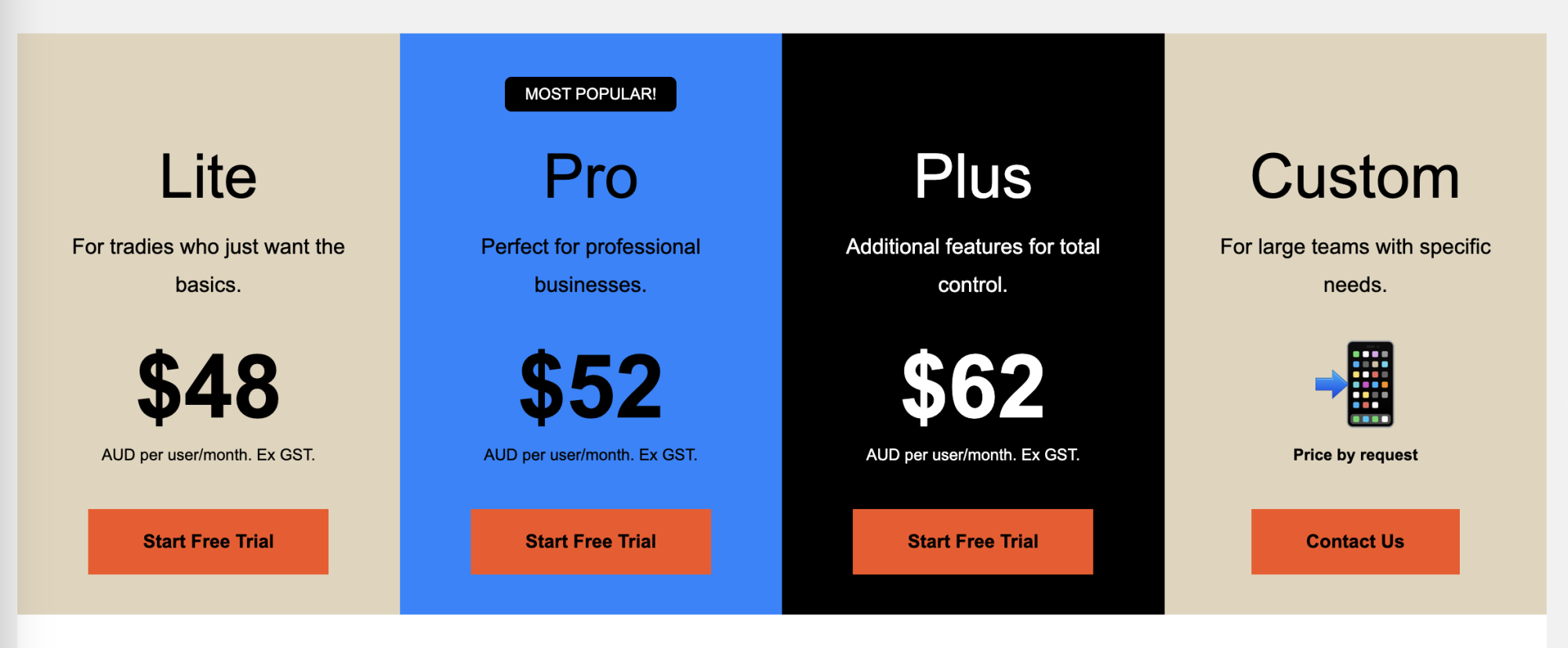
Lite starts at $48 per user per month, with prices climbing as you unlock more features.
Custom pricing is reserved for larger teams and you'll need to contact Tradify for a quote.
Tradify does offer annual subscriptions, but there's no advertised discount for paying for the year upfront.
So unlike some apps that will knock a month or two off the price for an annual commitment, there aren’t any obvious savings here.
Lite plan: $48 per month
Tradify Lite costs $48 per user, per month, excluding GST.
It covers the basics of managing jobs, sending quotes and invoices, keeping your schedule organised, and getting paid.
Here’s what you get:
Job management, notes and tracking: Keep job details, notes, documents and activity in one place, so it’s easier to see what is happening with each job.
Scheduling and Google Calendar sync: Add jobs and appointments to your Tradify schedule, then sync with Google Calendar.
Quoting and invoicing: Create and send professional quotes and invoices.
Pricing and markups: Add pricing for materials and labour, then apply markups to help keep track of margins.
Online and credit card payments: Give customers the option to pay invoices online instead of relying on bank transfers.
Email tracking: See whether a customer has opened an email sent through Tradify. Useful when you’re waiting on a quote approval or invoice payment.
Accounting software sync: Connect Tradify with Xero, MYOB or QuickBooks Online so your job and invoice data can flow into your accounting software.
Who is Tradify Lite best for?
Lite makes the most sense for solo tradies and very small trade businesses that mainly need somewhere to manage jobs, quotes, invoices and their calendar.
The main limitation is that quite a few useful features sit behind the Pro plan:
Timesheets
Job costing
Recurring jobs
Appointment reminders
Quote templates
Progress invoicing
Since Pro costs only $4 more per user each month, most business owners should only consider Lite if they know they'll only need basic admin and scheduling tools.
Want a tool that covers the admin at almost half the price of Lite?
For sole traders that want one simple tool for sending professional quotes, getting paid, and staying on top of expenses and tax, Rounded might be a better fit. Plans start at $23.95 / month.
See how Rounded works for solo tradiesPro plan: $52 per month
Tradify Pro costs $52 per user, per month, excluding GST.
While it is only $4 more than Lite, it adds a much longer list of features for quoting, job tracking, customer communication and admin.
You get everything in Lite, plus:
Custom branding: Add your logo and brand colours to forms and documents sent through Tradify.
Enquiry form and email inbox: Bring new customer enquiries into Tradify through a branded form and dedicated email address.
Customer communication history: Keep a record of messages sent through Tradify, so you can check previous conversations without searching through your inbox.
Job photos and files: Store photos, videos and other documents against individual jobs.
Recurring jobs and custom statuses: Set repeat work to create automatically and add your own statuses to match how you manage jobs.
Job templates: Save common jobs as templates instead of creating from scratch.
Personal to-do list: Keep track of admin and other tasks inside Tradify.
Appointment reminders: Automatically remind customers about upcoming appointments.
Quote options and online acceptance: Give customers different options within a quote and let them accept it online.
Progress invoicing: Collect deposits and issue progress invoices as work moves along.
Quote and invoice reminders: Automatically follow up on quotes that need approval and invoices that have not been paid.
Quote and invoice templates: Create reusable templates for documents you send regularly.
Costing and bill tracking: Record bills against jobs and compare your costs with what you charge the customer.
Timesheets: Record hours worked against individual jobs for costing and invoicing.
Subcontractor scheduling: Assign work to subcontractors and include them in your Tradify schedule.
Health and safety forms: Create and send health and safety documents from Tradify.
Compliance certificates: Create and send compliance certificates without moving to another system.
Who is Tradify Pro best for?
This is probably the more practical starting point for many trade businesses.
Features such as job costing, timesheets, recurring jobs and progress invoicing are the sort of things you may quickly miss once you are managing more than a handful of jobs.
It also makes more sense if you have employees or subcontractors, or if you regularly deal with larger jobs that need deposits and progress payments.
If you're a sole trader, however, $52 per month can be a bit steep. It may be worth considering if there are other alternatives that offer similar features.
Plus plan: $62 per month
Tradify Plus costs $62 per user, per month, excluding GST.
It includes everything in Pro, plus a handful of extra tools for purchasing, reporting, repeat servicing and larger teams.
You get everything in Pro, plus:
SmartRead for Bills: Upload bills and let Tradify pull out the relevant cost information.
SmartWrite: Generate and improve descriptions for quotes, invoices and other customer communications.
Service reminders: Automatically remind customers when regular servicing or maintenance is due.
Job tasks: Break jobs into individual tasks, assign them and keep track of what has been completed.
Purchase orders: Create purchase orders from scratch or generate them from quotes, then send them directly to suppliers.
Bulk invoicing: Create invoices for multiple jobs together instead of one at a time.
Kit bundles: Save common combinations of parts and labour, then add the whole bundle to a quote when you need it.
Staff activity history: See what different users have changed or completed inside Tradify.
Job service reports: Turn job information into reports that you can send to customers.
Reporting: Get more visibility into job and business data without exporting everything into another system.
Who is Tradify Plus best for?
Plus starts to make more sense once you have several people using Tradify.
Purchase orders, bulk invoicing, staff activity history and reporting become much more useful when there is more going on across the business.
It’s also worth considering if repeat servicing makes up a meaningful part of your work.
Service reminders can help bring customers back when maintenance is due, without someone having to keep track of every date separately.
This isn't a feature that will be worth the upgrade alone, but if you have need for other features included in this plan, it can definitely be a bonus.
Custom plan: Pricing on request
Larger businesses can contact Tradify to get a quote for a custom plan that is tailored to their requirements.
Custom plans include everything in Plus, along with the option to add the following:
Instant Business Website: $19 per month
SMS quotes and invoices: $0.20 per message.
SMS reminders for appointments, quotes and payment reminders: $0.20 per message.
Who is Tradify Custom best for?
Tradify describes Custom as its plan for large teams with specific needs.
This is the option to look at once the standard per-user plans stop being a good fit for the size or setup of your business.
There is one downside from a pricing perspective: you cannot see what Custom will cost without speaking to Tradify first.
Since the published feature list simply includes everything from Plus, the main reason to consider Custom is likely the size of your team, rather than access to another set of features.
How much does Tradify cost as your team grows?
Tradify charges per user. Add a few employees and the monthly cost climbs pretty quickly.
It is worth noting that Tradify says that better team pricing may be available if you contact them directly.
Here’s what you would pay at the standard advertised rates (excluding GST):
Number of users | Lite | Pro | Plus |
1 | $48 | $52 | $62 |
3 | $144 | $156 | $186 |
5 | $240 | $260 | $310 |
10 | $480 | $520 | $620 |
For a sole tradie, this isn't as much of an issue because you're only paying for one user (although $48-$52 per month may still be out of budget for some sole traders).
Per-user pricing becomes a much bigger consideration if you plan to hire staff and give each person their own Tradify account.
Five users on Pro, for example, works out to $260 per month before GST, or $3,120 over 12 months at the standard monthly rate.
What extra fees does Tradify charge?
Your monthly subscription is not necessarily the only Tradify cost to budget for.
There are a few optional extras and usage fees:
Instant Website: $19 per month. Tradify can create a basic website using information from your account.
SMS quotes and invoices: $0.20 per message.
SMS appointment, quote and payment reminders: $0.20 per message on plans that support these reminders.
Credit card payments: Tradify charges $0.30 plus 1.9% of the invoice total for standard Australian cards. American Express transactions attract a higher percentage fee of 3.7%. These payment fees include GST.
None of these extras will necessarily make Tradify expensive on their own.
But SMS messages, card processing and the monthly subscription can add up, so it is worth considering the total cost rather than just the advertised plan price.
Does Tradify offer annual billing?
Tradify supports annual subscriptions, although it does not publish the yearly rate on its Australian pricing page.
Tradify's help centre refers to a Yearly Billing Offer, so it’s worth contacting the company to find out what rate is currently available before choosing monthly billing.
There is an important catch, though.
Annual subscriptions are paid for a year in advance.
If you decide to remove a user mid-year, you can’t reduce the number of paid users until your yearly billing cycle finishes.
Tradify also doesn’t refund annual subscription charges if you cancel before the 12 months are up, making annual billing less flexible if your team size changes regularly.
Does Tradify lock you into a contract?
Not if you choose standard monthly billing.
Tradify says its monthly subscriptions have no contract or ongoing commitment, and you can cancel whenever you like.
Monthly subscriptions are also billed in arrears and calculated on a prorated basis. If your number of users changes during the month, your bill is adjusted accordingly.
Annual billing works differently. You can still cancel, but charges you have already paid for the year are not refunded.
The verdict: Choosing the right plan for your business
Tradify gives you plenty of room to choose how much job management functionality you actually need.
For solo tradies and small businesses, Lite and Pro are the 2 plans worth considering.
Plus starts to make more sense when there is a higher volume of work to manage, while Custom is aimed at larger businesses.
Here is the quick version:
Need the basics? Lite gives you job management, scheduling, quotes and invoices for $48 per user each month, but you will be missing out on a few key features that can help you spend less time on admin during the week.
Need better control over your jobs? Pro is probably the sweet spot. You get job costing, timesheets, progress invoicing, recurring jobs and a much longer list of useful features.
Do a lot of repeat work or purchasing? Plus adds service reminders and purchase orders. You also get bulk invoicing and reporting for $62 per user each month.
Running a larger trade business? Custom gives you everything in Plus with pricing based on your business.
Is Tradify worth it for a sole trader?
Tradify is first and foremost job management software for trade businesses.
While many solo tradies do benefit from having a tool like this, others may end up paying for a lot of functionality they rarely touch.
When Tradify is a good fit for sole traders
Tradify may be a good fit if you:
Manage several jobs at once, and need a proper system to schedule and keep job information organised
Need in-depth cost and profitability tracking for each job
Regularly work with subcontractors and need to assign jobs through the same system
When sole traders should consider an alternative to Tradify
You may want to compare Tradify with other options if:
You want a more affordable app to do quoting, invoicing, online payments, time tracking, expenses, and tax in one place
You don’t want to pay for a separate accounting app on top of Tradify
You're fine using your existing calendar / booking system and don't need built-in job or staff scheduling
Tradify starts at $48 per month before GST, so it is worth being realistic about how often you will use its trade-specific features.
What is the best alternative to Tradify in Australia for sole traders?
If Tradify offers more job management functionality than your business needs, Rounded is one alternative worth considering.
Rounded was built for Australian sole traders to help with financial admin that comes with working for yourself, like quoting, getting paid, and tracking your expenses. It can also help you stay on top of tax throughout the year.
Tradify Pro vs Rounded Pro for sole traders
Tradify | Rounded | |
Price | $52/user/month (excluding GST) | $29.95/month (including GST) |
Free trial | 14 days | 14 days |
Send professional quotes and invoices | Yes | Yes |
Customisable quote and invoice templates | Yes | Yes |
Saved line items for faster quoting | Yes | Yes |
See when quotes and invoices are opened | Yes | Yes |
Automatic quote and invoice reminders | Yes | Invoice reminders only |
Recurring invoices | Yes | Yes |
Deposits and progress invoices | Yes | Yes |
Online payments | Yes | Yes |
Timesheets | Yes | Yes ( + automatically turn tracked hours into invoice) |
Assign expenses to customers | Yes | Yes |
Create expenses automatically from bills | No | Yes |
Import income and expenses from bank transactions | No | Yes |
Store receipts in one place | No | Yes |
Real-time tax estimates | No | Yes |
Automatic GST tracking | No | Yes |
Automatic BAS preparation | No | Yes |
Automatic reports for your tax return | No | Yes |
Income, expense, and profit reporting | No | Yes |
Share secure access with accountant | No | Yes |
Automatic KM tracking for vehicle expenses | No | With Rounded Trax ($5/month) |
Job scheduling | Yes | No |
Job management, notes, files, and tracking | Yes | No |
Appointment reminders | Yes | No |
Subcontractor scheduling | Yes | No |
Accounting integrations | Xero, MYOB, QuickBooks Online | N/A (all-in-one app) |
Founded in | New Zealand | Melbourne, Australia |
Built specifically for sole traders | No | Yes |
The choice really comes down to:
Whether you need built-in job scheduling and management tools
Whether you have employees or plan to hire in the near future
Whether you want to use multiple apps to manage your business finances
If the answer to all of the above is no, it may be worth doing a 14-day free trial of Rounded to see if an all-in-one invoicing and accounting app might be a better fit for your business.
Rounded pricing vs Tradify pricing
Rounded Starter costs $23.95 per month and includes customisable invoices and quotes, time tracking, recurring invoices and expenses, receipt capture, tax estimates and financial reports.
Rounded Pro costs $29.95 per month and adds bank feeds, automatic GST tracking, BAS reporting, and superannuation tracking.
You can also pay for either plan annually and get one month free.
Tradify clearly wins if you need proper job scheduling and other trade-specific operational tools. Rounded does not try to replace those features.
But if you are a solo tradie who mainly needs to send invoices, track income and expenses, keep an eye on tax and prepare for BAS, Rounded covers those needs for considerably less each month.
Final thoughts: Is Tradify worth the price?
Tradify packs a lot into its plans, particularly once you move up to Pro.
If you run a trade business and need proper job scheduling, job costing, staff management and subcontractor coordination, paying $52 or $62 per user can make sense.
These are areas where simpler invoicing and accounting apps cannot replace Tradify.
For a sole trader, however, it comes down to how complicated your jobs are.
If you need Tradify's scheduler and job management features every day, even the $48 Lite plan could be money well spent.
But if most of what you need is invoicing and financial admin, Tradify can leave you paying for features you don’t really need.
Rounded takes the second approach. It was built specifically for Australian sole traders and starts at $23.95 per month.
Even the Pro plan costs considerably less than Tradify Lite at just $29.95 per month
Rounded Pro also includes the features that tend to matter once tax gets more complicated, including bank feeds, GST tracking and prepared BAS figures.
So if job scheduling is central to how you work, Tradify is likely to make more sense.
If you mainly want an easier way to manage the money side of being a sole trader, Rounded may give you more of what you actually need for a lower monthly price.
See if Rounded will suit your trade business
Try free for 14 days. No credit card needed.
Try Rounded freeTradify pricing FAQs
Does Tradify have a free plan?
No. Tradify does not have a permanently free plan.
It does offer a 14 day free trial, which gives you access to all Tradify features so you can test the software before choosing a paid plan.
Do you need a credit card for the Tradify free trial?
Tradify allows you to start its 14 day trial before moving onto a paid subscription. The trial includes all features rather than limiting you to Lite.
Does Tradify charge per user?
Yes. Lite, Pro and Plus are all priced per user, per month.
Tradify also says businesses with larger teams can contact the company about team pricing, which may reduce the cost per user.
Can you pay for Tradify annually?
Yes. Tradify supports yearly subscriptions, but it does not currently publish the annual rate on its Australian pricing page.
Its help centre refers to a Yearly Billing Offer, so you will need to contact Tradify to find out the current price.
Can you cancel Tradify at any time?
Monthly subscribers can cancel at any time, with no ongoing contract.
If you have paid annually, you can still cancel your subscription, but Tradify does not refund the unused portion of the year.
Are Tradify prices inclusive of GST?
No. Tradify's advertised Australian Lite, Pro and Plus subscription prices exclude GST.
Its Australian card processing fees, on the other hand, are advertised inclusive of GST.
What is the cheapest Tradify plan?
Tradify Lite is the cheapest paid plan at $48 per user per month, excluding GST.
Contents
Join newsletter
ABOUT ROUNDED
Invoicing and accounting software for sole traders. Get paid faster and relax at tax time.